How the waitlist works
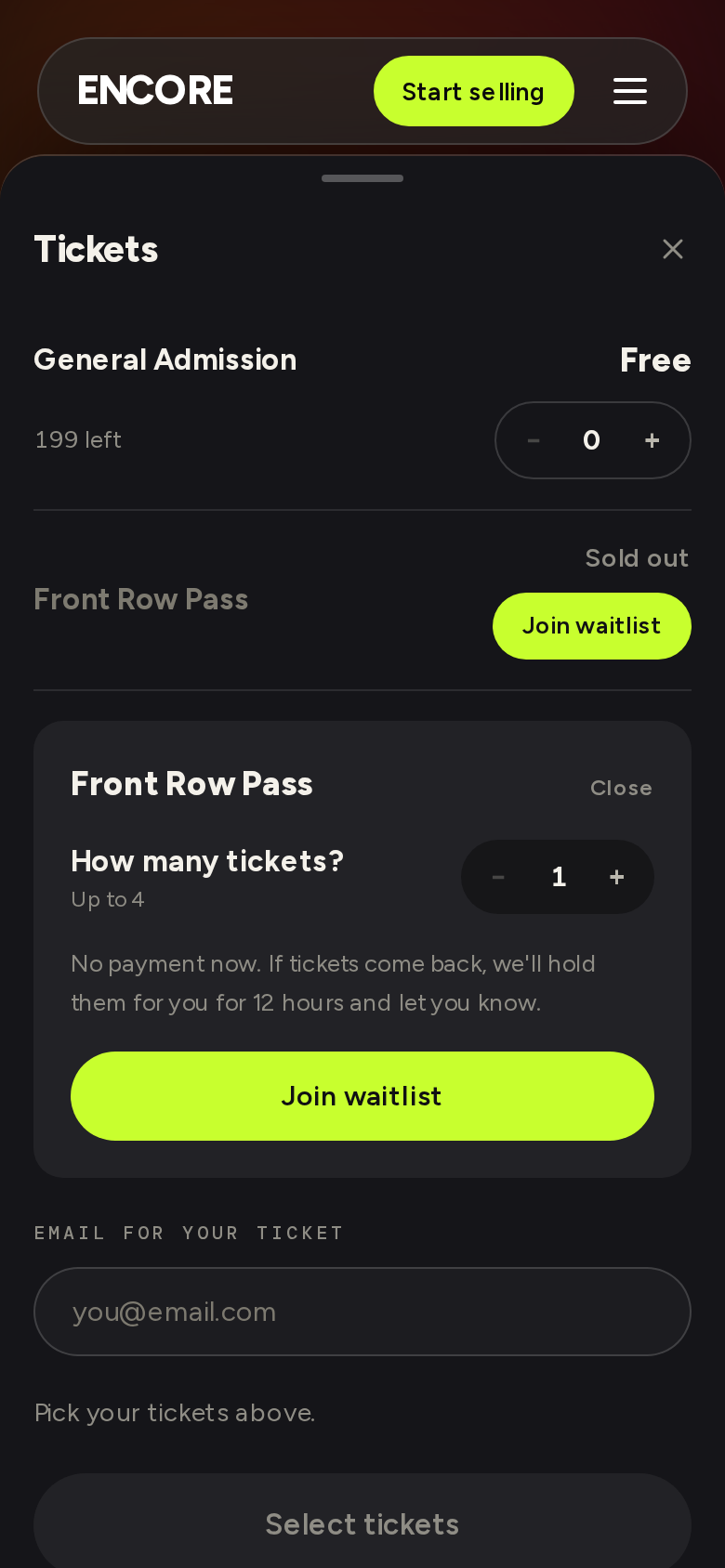
When a ticket type sells out, you can join its waitlist if the organizer has turned it on. The sold-out row shows Join waitlist.
- Tap Join waitlist. You need to be signed in. Choose how many tickets you want, up to 4, and tap Join waitlist again. You don't pay anything to join.
- If tickets come back, we hold them for you and email you. The subject starts "Tickets are held for you". The email says exactly when the hold ends. The usual hold is 12 hours; the organizer can set 1, 4, 12 or 24 hours.
- Tap Buy now in the email. The event page shows "Held for you until" the time, and you buy as normal, at the normal price, fees included. A promo code still works.
While you're on a waitlist, the sold-out row says On waitlist.
If you miss the hold
The tickets go to the next person and your place on that waitlist ends. The page says "Your hold has ended. These tickets were offered to the next person." You can tap Join the waitlist again, at the back of the line.
Limits
You can be on up to 10 waitlists at once. The waitlist email has a link to your waitlists, where you can see each one and tap Leave waitlist. You can also leave from the event page.
Why there's no place-in-line number: see Why can't I see my place in line?